 BackupWatch Docs
Which method should you use?
| Method | Setup effort | Use it when |
|---|---|---|
| App password | Minutes. No Google Cloud project. | You want the fastest path, and a stored (encrypted) password is acceptable. |
| Sign in with Google (OAuth) | Longer — needs a Google Cloud OAuth client. | Policy forbids stored passwords, or you want BackupWatch to send alerts from the mailbox as well as read it. |
Common settings
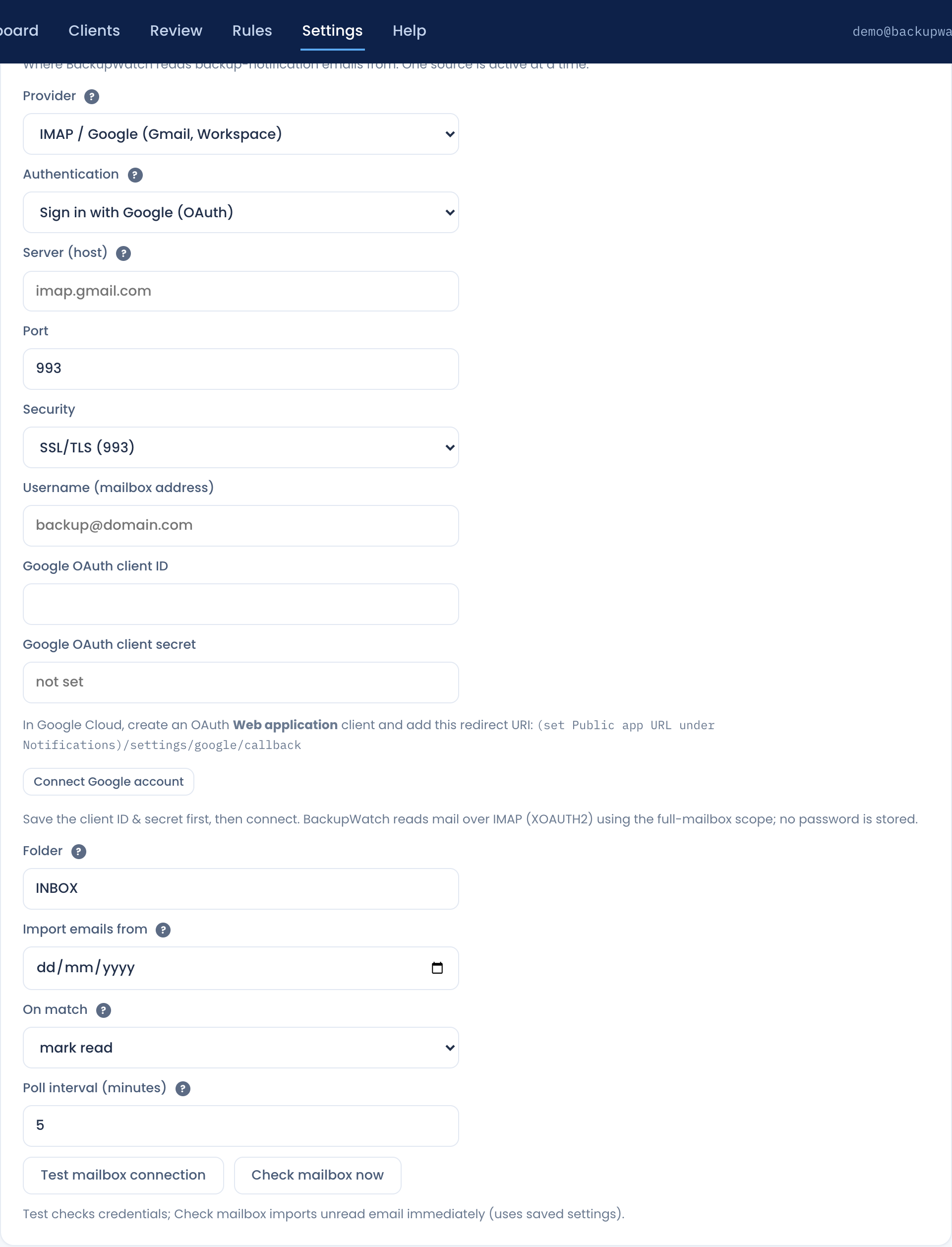
Whichever method you choose, start in Settings → Mailbox and set Provider to IMAP / Google (Gmail, Workspace). Then:
| Field | Value |
|---|---|
| Server (host) | imap.gmail.com |
| Port | 993 |
| Security | SSL/TLS |
| Username | The full mailbox address, e.g. backup@yourmsp.com |
| Folder | INBOX by default. In Gmail a label acts
as a folder, so a label name works here too. |
Method 1 — App password
Google blocks plain password sign-in for IMAP, so a normal account password will not work. You need an app password, which requires 2-step verification on the account.
- Turn on 2-step verification for the mailbox account.
- Create an app password — Google's guide ↗.
- Make sure IMAP is enabled for the account (Gmail settings → Forwarding and POP/IMAP).
- In BackupWatch set Authentication to Password / app password, paste the app password, and save.
Secrets are encrypted at rest and never shown back — once saved the field reads "•••• stored". Use Test mailbox connection to confirm it works.
Method 2 — Sign in with Google (OAuth)
BackupWatch connects with your own Google Cloud OAuth client, so the consent screen and the tokens belong to your organisation rather than to us. It reads mail over IMAP using XOAUTH2 with the full-mailbox scope, and no password is stored.
Step 1 — Set the Public app URL first
(set Public app URL under Notifications)/settings/google/callback instead of a
usable URI, and the connection will fail. Set it to the address staff use to reach
BackupWatch — for example https://backup.yourmsp.com — and save.
Step 2 — Create the OAuth client in Google Cloud
- In the Google Cloud console ↗, select or create a project.
- Configure the OAuth consent screen. For a Workspace domain, choosing Internal keeps it to your own users and avoids Google's verification review.
- Under Credentials, create an OAuth client ID of type Web application. Desktop and other client types will not work.
- Add this Authorized redirect URI, matching your Public app URL exactly
— scheme, host, port and all:
https://backup.yourmsp.com/settings/google/callback - Copy the generated client ID and client secret.
Step 3 — Connect
- Set Authentication to Sign in with Google (OAuth).
- Paste the Google OAuth client ID and client secret.
- Save settings first. The connect button uses the saved credentials, so connecting before saving fails.
- Click Connect Google account and complete Google's consent screen. You are returned to BackupWatch and the connected address is shown.
- Run Test mailbox connection.
Reconnect re-runs consent — use it after changing scopes or if the grant is revoked. Disconnect drops the token, and polling stops until you reconnect or switch provider.
Sending alerts from the same mailbox
Once connected with OAuth, BackupWatch can send alerts, daily summaries and user invites as the mailbox it monitors — no SMTP server, no second password. Set Settings → Notifications → Outbound email → Send notifications via to The connected mailbox.
Full detail, including the Microsoft 365 equivalent and when you still want a separate SMTP server, is in Alerts & Email.
Troubleshooting
| Symptom | Likely cause |
|---|---|
redirect_uri_mismatch on the consent screen |
The URI in Google Cloud doesn't exactly match Public app URL +
/settings/google/callback. Check for a missing https,
a trailing slash, or a port. |
| The redirect URI shown in BackupWatch contains "(set Public app URL…)" | Public app URL is blank — set it on the Notifications tab. |
| Connect button returns immediately without a Google prompt | Client ID/secret weren't saved before connecting. |
| Authentication fails with an app password | 2-step verification is off, IMAP is disabled on the account, or the account password was used instead of the app password. |
| Polling stopped and the health watchdog emailed | The OAuth grant was revoked or expired. Reconnect the account. |